
What is a Metadata Cleaner?
Images often carry information you cannot see: device details, capture dates, GPS coordinates, editor history, creator fields, and provenance records.
A metadata cleaner creates a sanitized sharing copy without retaining unnecessary hidden records. aimetadataremover.co uses a proprietary local cleaning process designed to preserve the visible result.
The process runs locally, so the picture itself is never transmitted to an image-processing service.
Real files · honest results
What actually changes after a clean?
These three supplied images show the difference between hidden file data and visible content. The cleaner creates a fresh sharing copy with common hidden metadata removed. Visible labels remain because they are part of the picture.
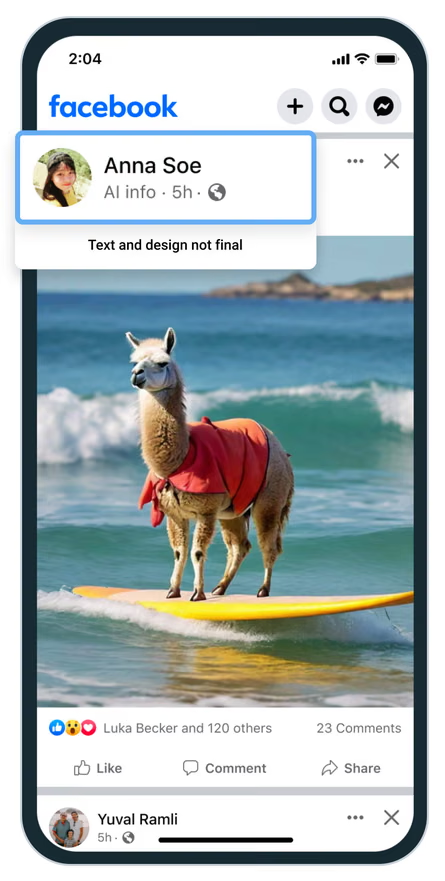 Real AVIF example
AI info over a surfing llama
Metadata container detected.
Hidden records removed.
Visible result: the “AI info” card stays. It is baked into the pixels, not stored as removable hidden metadata.
 Real WEBP example
Made with AI over a cat post
Metadata container detected.
Hidden records removed.
Visible result: the “Made with AI” badge stays because it is visible artwork inside this example image.
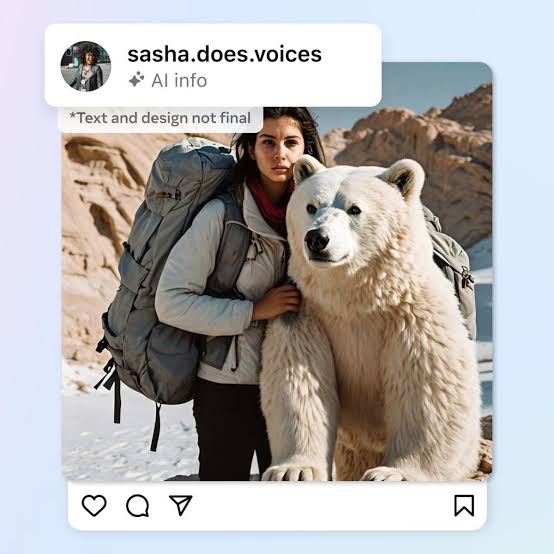 Real JPEG example
AI info over a social post
Metadata container detected.
Hidden records removed.
Visible result: the “AI info” label and account card stay. Metadata cleaning does not erase visible pixels.
Important: aimetadataremover.co removes hidden file metadata; it does not promise to remove platform labels, visible watermarks, or pixel-based classifiers. A platform may also keep labels from earlier uploads.
A thorough clean
What the cleaner removes
Common privacy, provenance, and AI-generation records are discarded in one pass.
EXIF data
Camera model, exposure settings, software names, timestamps, and device identifiers.
GPS & location
Coordinates and geotags written by phones, cameras, and photo-management apps.
XMP & IPTC
Creator information, captions, copyright, keywords, ratings, and edit history.
C2PA credentials
Embedded provenance manifests and content-authenticity assertions.
Generation settings
Prompts, seeds, sampler names, CFG scale, and model identifiers.
AI signatures
Generator and application tags left by popular creative tools.
Output renewal
The proprietary cleaner produces a technically distinct sharing file.
PNG text chunks
tEXt, iTXt, and zTXt blocks commonly used to store workflow details.
Built for careful sharing
Privacy without the upload queue
Thorough cleaning
A fresh sharing copy is produced without retaining common hidden source records.
See the four-step process →Complete local privacy
File handling, inspection, cleaning, and export all happen in this tab.
Read the privacy scope →Fast processing
No upload or queue is required. Most everyday images finish in a moment.
Compare approaches →Made for real workflows
For creators, teams, and private sharing
Digital artists
Prepare generated artwork for portfolios and client handoff.
Social teams
Remove embedded production details before scheduling posts.
Online sellers
Clean artwork and product imagery before marketplace uploads.
Publishers
Share campaign and editorial images without device traces.
Agencies
Create sanitized deliverables for multi-client workflows.
Privacy-minded users
Remove location and camera details from personal photos.
Nothing leaves your browser
How it works
Four local steps turn the original file into a clean sharing copy.
Choose
Select one image on Free, or up to ten at once with Pro after billing launches.
Inspect
The proprietary engine checks each file for supported hidden records.
Clean
A sanitized sharing copy is prepared locally in your browser.
Export
Download each clean, optimized JPEG when it is ready.
Side-by-side
How local cleaning compares
| Feature | aimetadataremover.co | Basic EXIF tools | Upload services |
|---|---|---|---|
| Client-side processing | ✓ | ✓ | — |
| C2PA / provenance removal | ✓ | — | ✓ |
| Fresh technical output | ✓ | — | — |
| No installation | ✓ | — | ✓ |
| No image transfer | ✓ | ✓ | — |
100% client-side
The app blocks outbound data connections; files remain in browser memory.
No waiting room
Processing begins immediately without an upload or remote queue.
Ten free uses every day
Use the browser tools ten times per day before choosing whether Pro suits your workflow.
Prepare clean copies for
Tiny price · serious privacy
Choose your plan
Get access to the complete privacy toolkit. Start with 10 uses per day, or move to unlimited usage and ten-image batches for $3 per month.
Free
For occasional work and a no-pressure test of the local privacy toolkit.
- 10 uses per day across browser tools
- All available image tools included
- Image conversion and privacy analysis
- Instant local download
Pro
For creators, teams, and shops that prepare images regularly.
- Unlimited usage across all browser tools
- Batch processing (10 at once)
- Advanced converter formats and privacy tools
- Priority support and cancel anytime
Stripe checkout will open after payments are connected.
Every detail
Full Feature Comparison
| Feature | Free | Pro |
|---|---|---|
| Tools included | ||
| AI Metadata CleanerStrip EXIF, XMP, GPS, and AI metadata | ✓ | ✓ |
| Image Privacy AnalyzerInspect privacy and provenance signals | ✓ | ✓ |
| Content Credentials CheckerCheck C2PA provenance indicators | ✓ | ✓ |
| Image Diff ToolCompare original and exported pixels | ✓ | ✓ |
| Image Format ConverterConvert modern browser image formats | ✓ | ✓ |
| Image Resizer & CompressorResize, compress, and optimize images | ✓ | ✓ |
| Invisible WatermarkPlanned addition to the eight-tool suite | When released | When released |
| Batch EXIF EditorPlanned addition with enhanced Pro batching | When released | When released |
| Usage & limits | ||
| Daily usage limitShared across browser tools | 10 / day | Unlimited |
| Batch processingProcess multiple images at once | 1 at a time | 10 at once |
| Max file sizePer image | 10 MB | 20 MB |
| Support | ||
| Priority support | — | ✓ |
Billing status: no payment is collected yet. The paid unlock will only go live after secure server-side Stripe Checkout and verified webhooks are connected.
Useful details
Frequently asked questions
What is an image metadata cleaner?+
It removes hidden file information such as camera details, coordinates, editing history, creator fields, and generator records.
Does this remove both EXIF and AI tags?+
Yes. The export is rebuilt from pixels, so standard photo metadata and AI-specific text or provenance blocks are not carried into the new file.
Are my images uploaded or stored?+
No. The protected local workflow keeps image cleaning inside your current browser tab.
Will the clean copy look different?+
The cleaning process is designed for visual consistency. Normal JPEG export can introduce subtle compression differences.
What can this tool not remove?+
It cannot remove visible marks, signals baked into pixels, or control how a third-party classifier interprets an image.
A complete media toolkit
Explore more privacy tools
Metadata cleaner
Strip privacy and provenance records locally.
→ VideoVideo metadata cleaner
Clean supported MP4 and MOV records without re-encoding.
→ ForensicsPrivacy analyzer
Inspect common metadata signatures before cleaning.
→ C2PACredentials checker
Look for content-provenance indicators.
→ CompareImage diff
Compare original and exported pixels.
→ ConvertImage converter
Create clean JPEG copies from modern formats.
→ ResizeImage compressor
Optimize dimensions and file size for sharing.
→From the field notes
Latest privacy guides
What your photos quietly reveal
A practical look at EXIF, XMP, IPTC, GPS, and how each travels with a file.
9 min readUnderstanding local image cleaning
What local processing means for privacy, outputs, and responsible sharing.
12 min readPreparing generated art for client delivery
A privacy-first checklist for handing off artwork without workflow baggage.
7 min read